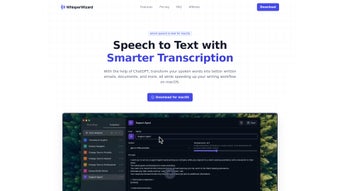

Download WhisperWizard – AI Voice‑to‑Text Tool for macOS
Overview
WhisperWizard is a purpose‑built AI voice‑to‑text application that runs natively on macOS. Leveraging the power of OpenAI’s ChatGPT models, it transforms spoken language into accurate, ready‑to‑use text in real time. Whether you are drafting an email, preparing a report, or brainstorming ideas, WhisperWizard captures your voice, transcribes it, and places the result directly into the document or field you need.
The app is engineered for speed and privacy: recordings are processed locally before being sent to the AI engine, and WhisperWizard never stores your audio, transcripts, or custom templates on its servers, adhering strictly to OpenAI’s privacy policies. In addition to plain transcription, the tool offers a clever templating system that lets you assign shortcuts to frequently used blocks of text—think meeting minutes, standard replies, or coding snippets—so you can insert them instantly without breaking your flow. Past recordings are archived within the app for quick retrieval, and a single click copies the entire transcript to the clipboard.
The result is a seamless, secure, and highly efficient writing companion for anyone who spends a large portion of their day on a Mac.
Key Features & Installation Guide
Feature Highlights
- Real‑time transcription powered by ChatGPT, delivering near‑human accuracy.
- Custom templatization with keyboard shortcuts for rapid insertion of repetitive content.
- One‑click copying of transcripts to clipboard for instant pasting.
- Secure local processing; no audio or text data retained on external servers.
- Integrated recording library for fast access to previous sessions.
- Support for multiple languages and dialects, expanding usability worldwide.
- Lightweight macOS native UI that blends with the Apple ecosystem.
Step‑by‑Step Installation & First‑Use
Installing WhisperWizard is straightforward. Begin by visiting the official WhisperWizard website and clicking the “Download for macOS” button. The installer is a signed .dmg file, ensuring it passes Apple’s Gatekeeper checks. Once downloaded, open the .dmg and drag the WhisperWizard icon into your Applications folder. macOS may prompt you to confirm that you trust the developer; simply click “Open” to continue.
After launching the app for the first time, you’ll be guided through a brief onboarding wizard. The wizard asks you to grant microphone access—essential for capturing voice input—and optionally to enable “Accessibility” permissions so the app can paste text directly into other applications without manual copying. Both permissions are reversible via System Settings > Security & Privacy.
With permissions set, you can start a new transcription by clicking the red “Record” button or using the default shortcut ⌘ Shift R. Speak naturally; WhisperWizard displays a live word‑by‑word preview, letting you see the transcription evolve in real time. When you’re done, hit the stop button or press the shortcut again. The full transcript appears in the main pane, and a “Copy” icon lets you push the text to the clipboard instantly.
For templating, open the Settings panel, navigate to “Templates,” and create a new entry by typing a name, the content block, and assigning a unique shortcut (e.g., ⌘ T). Once saved, you can invoke the template from any window by pressing the shortcut—WhisperWizard will paste the predefined text wherever your cursor resides.
Compatibility, Pros & Cons, and Frequently Asked Questions
System Requirements
WhisperWizard requires macOS 12 Monterey or later. The application runs efficiently on Intel‑based Macs as well as Apple Silicon (M1, M2, and newer) thanks to a universal binary that automatically selects the optimal architecture. Minimum hardware specifications include 4 GB RAM and 200 MB of free disk space for the app and its temporary cache files.
Pros and Cons
- Pros
- High transcription accuracy thanks to state‑of‑the‑art AI.
- Zero data retention ensures privacy for sensitive content.
- Custom templates dramatically speed up repetitive writing tasks.
- Native macOS design provides a familiar, distraction‑free interface.
- Supports both Intel and Apple Silicon without performance penalties.
- Cons
- Requires an active internet connection for AI processing.
- No Windows or Linux version—limited to macOS ecosystem.
- Advanced language models may incur slight latency on slower networks.
FAQ
Is WhisperWizard free to use?
WhisperWizard offers a free tier with unlimited recordings, but advanced features such as premium templates and higher‑speed AI models are available through a paid subscription.
How does WhisperWizard protect my privacy?
All audio is sent to OpenAI’s servers only for transient processing, and WhisperWizard never stores the raw audio, transcripts, or template data on its own servers. The app follows OpenAI’s strict privacy policy, and any temporary cache is cleared after each session.
Can I use WhisperWizard offline?
Because the transcription engine relies on cloud‑based AI models, an internet connection is required for accurate conversion. However, the app’s UI and template management work offline; you can prepare notes and retrieve past recordings without connectivity.
Does WhisperWizard support multiple languages?
Yes. The underlying ChatGPT model can understand and transcribe a wide range of languages and dialects. You can select your preferred language in Settings, and the AI will adapt accordingly.
How do I create and use a template shortcut?
Open Settings → Templates, click “Add New,” type the template content, assign a unique keyboard shortcut, and save. When you press that shortcut in any macOS app, WhisperWizard will paste the template at the cursor location instantly.
Conclusion & Call to Action
WhisperWizard fills a niche that many macOS professionals have long awaited: a fast, secure, AI‑driven transcription tool that integrates flawlessly with Apple’s ecosystem. Its blend of real‑time accuracy, privacy‑first design, and powerful templating makes it more than a simple dictation app—it becomes a productivity accelerator for writers, developers, marketers, and anyone who prefers speaking over typing. While the need for an internet connection and the lack of cross‑platform support are minor trade‑offs, the benefits far outweigh these constraints for dedicated Mac users.
Ready to transform the way you capture ideas on your Mac? Download WhisperWizard today, try the free tier, and experience how effortless voice‑to‑text can be. For power users, consider the premium subscription to unlock faster processing and advanced template management. Boost your writing workflow, protect your data, and let your voice do the typing—WhisperWizard is just a click away.



.png)



